Game

New Cheat Real Racing 3 !!!.

Cheat for simulation

Enjoy cheat for simulate game work 100% in fantasy town and smurf.

Minecraft

Join Our Minecraft Server EnderGaming Now

Welcome

Enjoy The Post ^_^

Tampilkan postingan dengan label Laptop / PC. Tampilkan semua postingan

Senin, 06 Oktober 2014

Minecraft Server EnderGaming


Join Our Minecraft Server Now 
EnderGaming NetworkEnderGaming Network
1.7.2 - 1.7.10 Indonesia192.99.13.50:25931

Future In This Server
- Economy
- Faction
- Hunger Games
- Mcmmo
- Minigames
- Parkour
- PvP
- Spigot
- Survival
- War
FacebookJoin Our facebook Group

RSS FeedEnderCraft Website

Cara membuat flashdisk kebal virus

Buat anda yang suka bawa flashdisk kemana-mana, ini saya ada sedikit tips bagaimana caranya agar flashdisk anda itu kebal virus. mengingat flashdik kan uka dicolokin kemanana, jadi probabilitas untuk tererang virus juga cukup besar.
Langsung saja untuk melakukannya lakukan cara-cara berikut ini:
1. Buatlah sebuah folder dalam FlashDisk Anda, dan berikan nama "autorun.inf" (tanpa tanda kutip).
2. Masuk kedalam folder yang baru saja anda buat tersebut dan buatlah sebuah dokumen notepad didalamnya. Caranya klik kanan, pilih NEW > TEXT DOCUMENT, dan berikan sembarang nama untuk file yang baru saja anda buat (hasil akhirnya seperti pada gambar). Nama ini nantinya akan kita ganti dengan beberapa karakter khusus.
image
3. Setelah itu, kita akan membuka program CHARACTER MAP yang ada di START > ALL PROGRAMS > ACCESORIES > SYSTEM TOOLS > CHARACTER MAP.
image
4. Setelah CHARACTER MAP terbuka, pilih font yang ada embel2 unicode seperti Arial Unicode atau Lucida Sans Unicode. Scroll kebawah sampai anda melihat huruf2 Jepang, Korea,Cina, ato karakter2 aneh.
5. Pilih 4 atau 5 karakter yang anda inginkan, trus klik copy.
image
6. Ubah nama ato rename file teks yang telah anda buat pada langkah 2 diatas. Klik kanan pada file tersebut, pilih rename, selanjutnya tekan [CTRL] + [V]. Nama file pun berubah.
Jangan kaget bila nantinya anda akan melihat karakter seperti tanda kotak2 saja. Ga papa kok, itu normal kok.
image
image

Cara memperbaiki hardisk eksternal yang tidak terdeteksi


imageAnda mungkin pernah, jika mencolokkan hardisk eksternal lalu menunggu lama, tetapi hardisknya tidak muncul di windowsexploler, hiang begitu saja. nahh,, jika pernah atau sedangmengalaminya saat ini tidak usah panik apalagi mau dijual tuh hardisknya karena masih bisa diperbaiki kok, begini caranya:
  1. buka control panel dan pilih view all iconimage
  2. masuk ke administrative tool lalu ke komputer management
  3. Pada panel di sebelah kiri terdapat pilihan Disk Management dibawah Storage.image
  4. Pada Panel yang berada disebelah kanan, lihat Hardisk (drive) yang kehilangan Drive Letter tersebut, klik kanan dan pilih change drive letter and paths. Kemudian anda klik drive letter anda yang hilang, misalnya (E) maka pilihan change akan aktif. Setelah itu tampilan Assign the following drive letter akan muncul, dan anda tinggal pilih drive letter apa yang akan anda gunakan, biasanya sesuai abjad (A sd Z)
  5. Selamat, hardisk anda kini akan muncul di exploler anda lagi

Mengaktifkan task manager yang di blokir / dikunci


image
Bila kita ke warnet, terus kita mengaktifkan task manager dengan crtl+alt+delete, biasanya akan di kuncu dan muncul tulisan “task manager was disable by administrator”. hal ini tujuannya untuk mencegah tangan-tangan jahil pengguna warnet. nah,, untuk membuka kunci ini cranya adalah:
METODE 1
  1. Klik start
  2. Klik CMD
  3. Ketik: REG add HKCUSoftwareMicrosoftWindowsCurrentVersionPolicies System /v DisableTaskMgr /t REG_DWORD /d 0 /f
  4. Enter
METODE 2
  1. Klik start
  2. Klik CMD
  3. Ketik Regedit dan enter
  4. Cari tulisan: HKEY_CURRENT_USER Software Microsoft Windows CurrentVersion Policies System
  5. Pada panel kanan, delete nilai yang bernama DisableTaskMgr
METODE 3 (Hanya untuk windows XP)
  1. Klik start
  2. Klik CMD
  3. ketik gpedit.msc dan click OK
  4. Cari : User Configuration / Administrative Templates / System / Ctrl+Alt+Delete Options / Remove Task Manager
  5. Klik dua kali pilihanRemove Task Manager
  6. Set the policy ke Not Configured.
COPYRIGHTED: WWW.SOFT-GAMING.COM

Cara membuka komputer windows yang dipassword / dikunci


image
Cara ini digunakan jika anda mengunci komputer windows anda, tetapi anda lupa passwordnya. atau juga bisa digunakan untuk membobol password komputeratau laptop orang lain yang sengaja dikunci oleh yang bersangkutan hehehe. langsung saja ya tidak usah banyak bicara heheh. cekidot…
  1. Download software ini, linknya : Click here
    File itu berbentuk iso, jadi harus di burn dulu ke CD (bisa menggunakannero ataupun ultra iso). oiya password RAR: langsakers
  2. Sebelum masuk Windows, pijit Del ato F8, buat set Boot from CD.
  3. Akan muncul tampilan seperti ini:image
  4. Reset password Account yang mau kita masuki, masuk ke akun terus tekan “Y”
  5. Setelah selesai reset password, lalu restart komputer atau tekan “Y”
  6. taraaa,, sekarang windows itu tidak akan terpassword. kalau ternyata komputer itu adalah milik teman anda dan anda ingin menjahilinya, ayoo buat password baru biar dia shock dan bingung setengah mati Open-mouthed smile
  7. oiyaa,, ini cuma buat pengetahuan saja ya, dosa ditanggung penumpang 

Sabtu, 06 Juli 2013

registry cleaner Clean my PC key

Download Clean my pc registry
Download

key : D4C5-357C-E642-E1F7-AFC4-769F-E8D7-F181-44E5-13ED-929F-1ABB
name My utilities

Jumat, 05 Juli 2013

Cara membersihkan registri

bagi yang senneng main game online tinggal download dan run aja


Download

Rabu, 03 Juli 2013

HOw to Solve ur Data

Minggu, 30 Juni 2013

Download UBuntu for Windows


Software how to conect IRC MAC


Software IRC for MAC
Klik
My Utilities

Senin, 24 Juni 2013

cara menegaktifkan paket di Iphone

1. buka sttings
2. General > Celular
3. Celulaar data off
4. Baru aktifkan sekarang paketnya

Cara Mengganti / Mengubah Sub title


1. Download Dulu subtitle yang ingin di edit
2. double klik subtitlenya
3. klik yang aready instaled sofware|
4. next
5. browse cari notepad
6. oke

7. Nanti aka seperti ini

Sabtu, 04 Mei 2013

Cara On / Of fire wall

Nah ini dia

1. Klik Kanan di My Computer
2. Manage
3. Klik Service
4. Cari Windows fire wall
5. double klik

Jumat, 03 Mei 2013

Film Yang Berhubungan Dengan Computer

Steve Jobs

Steve Jobs

From Wikipedia, the free encyclopedia
Jump to: navigation, search
Steve Jobs
Shoulder-high portrait of smiling man in his fifties wearing a black turtle neck shirt with a day-old beard holding a phone facing the viewer in his left hand
Jobs holding a white iPhone 4 at Worldwide Developers Conference 2010
Born Steven Paul Jobs
February 24, 1955[1][2]
San Francisco, California, U.S.[1][2]
Died October 5, 2011 (aged 56)[2]
Palo Alto, California, U.S.
Cause of death Metastatic Insulinoma
Nationality American
Alma mater Reed College (dropped out)
Occupation Co-founder, Chairman and CEO,
Apple Inc.
Co-founder and CEO,
Pixar
Founder and CEO,
NeXT Inc.
Years active 1974–2011
Influenced by Edwin H. Land
Board member of The Walt Disney Company[3]
Apple Inc.
Religion Zen Buddhism (previously Lutheran)[4]
Spouse(s) Laurene Powell
(1991–2011, his death)
Children Lisa Brennan-Jobs
Reed Jobs
Erin Jobs
Eve Jobs
Relatives Patricia Ann Jobs (adoptive sister), Mona Simpson (biological sister)
Signature Steve Jobs signature.svg
Steven Paul "Steve" Jobs (/ˈdʒɒbz/; February 24, 1955 – October 5, 2011)[5][6] was an American entrepreneur[7] and inventor,[8] best known as the co-founder, chairman, and CEO of Apple Inc. Through Apple, he was widely recognized as a charismatic pioneer of the personal computer revolution[9][10] and for his influential career in the computer and consumer electronics fields, transforming "one industry after another, from computers and smartphones to music and movies..."[11] Jobs also co-founded and served as chief executive of Pixar Animation Studios; he became a member of the board of directors of The Walt Disney Company in 2006, when Disney acquired Pixar. Jobs was among the first to see the commercial potential of Xerox PARC's mouse-driven graphical user interface, which led to the creation of the Apple Lisa and, one year later, the Macintosh. He also played a role in introducing the LaserWriter, one of the first widely available laser printers, to the market.[12]
After a power struggle with the board of directors in 1985, Jobs left Apple and founded NeXT, a computer platform development company specializing in the higher-education and business markets. In 1986, he acquired the computer graphics division of Lucasfilm, which was spun off as Pixar.[13] He was credited in Toy Story (1995) as an executive producer. He served as CEO and majority shareholder until Disney's purchase of Pixar in 2006.[14] In 1996, after Apple had failed to deliver its operating system, Copland, Gil Amelio turned to NeXT Computer, and the NeXTSTEP platform became the foundation for the Mac OS X.[15] Jobs returned to Apple as an advisor, and took control of the company as an interim CEO. Jobs brought Apple from near bankruptcy to profitability by 1998.[16][17][18]
As the new CEO of the company, Jobs oversaw the development of the iMac, iTunes, iPod, iPhone, and iPad, and on the services side, the company's Apple Retail Stores, iTunes Store and the App Store.[19] The success of these products and services provided several years of stable financial returns, and propelled Apple to become the world's most valuable publicly traded company in 2011.[20] The reinvigoration of the company is regarded by many commentators as one of the greatest turnarounds in business history.[21][22][23]
In 2003, Jobs was diagnosed with a pancreas neuroendocrine tumor. Though it was initially treated, he reported a hormone imbalance, underwent a liver transplant in 2009, and appeared progressively thinner as his health declined.[24] On medical leave for most of 2011, Jobs resigned in August that year, and was elected Chairman of the Board. He died of respiratory arrest related to his metastatic tumor on October 5, 2011.
Jobs received a number of honors and public recognition for his influence in the technology and music industries. He has been referred to as "legendary", a "futurist" or simply "visionary",[25][26][27][28] and has been described as the "Father of the Digital Revolution",[29] a "master of innovation",[30][31] and a "design perfectionist".[32][33]

Rabu, 01 Mei 2013

7 Negara Dengan Hacker Terkuat

1. Amerika
Anonymous (used as a mass noun) is a loosely associated hacktivist group. It originated in 2003 on the imageboard 4chan, representing the concept of many online and offline community users simultaneously existing as an anarchic, digitized global brain.It is also generally considered to be a blanket term for members of certain Internet subcultures, a way to refer to the actions of people in an environment where their actual identities are not known. strongly opposes Internet censorship and surveillance, and has hacked various government websites. It has also targeted major security corporations. It also opposes Scientology and government corruption. Its members can be distinguished in public by the wearing of styuysed Guy Fawkes masks.
2. Israel
The hackers, who call themselves IDF Team, said their actions were a response to a series of attacks on Israeli sites the previous day.
3. German
In what is being called a “cyber-war,” the Anonymous-related hacker group known as Team GhostShell has allegedly swiped 2.5 million Russian government accounts and records. The hack was retaliation against Russia’s long history as “a state of tyranny and regret,” Team GhostShell claimed in a PasteBin document.

4. Rusia

5. China
As few as 12 different Chinese groups, largely backed or directed by the government there, do the bulk of the China-based cyberattacks stealing critical data from U.S. companies and government agencies, according to U.S. cybersecurity analysts and experts.
6. India
IHF ( IndiaHacker Community )
7. Australia
In The Realm of the Hackers is a 2003 Australian documentary irected by Kevin Anderson about the prominent hacker community, centered in Melbourne, Australia in the late 1980s until early 1990. The storyline is centered around the Australian teenagers going by the hacker names "Electron" and "Phoenix", who were members of an elite computer hacking group called The Realm and hacked into some of the most secure computer networks in the world, including those of the US Naval Research Laboratory, Lawrence Livermore National Laboratory, a government lab charged with the security of the US nuclear stockpile, and NASA. The film runs for 55 minutes and was inspired by the book Underground, by Melbourne-based writer and academic Suelette Dreyfus.

Sabtu, 27 April 2013

Cara mempercepat startup

***CARA MEMPERCEPAT STARUP***


Langsung rede


1.Download CCleaner:http://www.piriform.com/ccleaner
2.Instal CCleaner trus buka CCleaner
3. Klik Tools

4.Udah deh :D Ubah jdi NO/Tidak Aplikasi yng tdak penting pada startup

Cara laen tanpa software

1.Tekan Win + R (Win di sebelah kiri alt)
2.Ketik msconfig,enter
3.cari startup
4.dah deh centang tuh aplikasi yng g perlu saat startup

Minggu, 21 April 2013

cara boot thethered untuk iphone yang di jailbreak thetered

   Untuk anda yang iphone-nya di jailbreak secara thetered, mungkin akann sedikit menyusahkan ketika iphone tersebut ter-restart, terlebih lagi jika iphone anda adalah verrsi software unlock, karena jailbreak akan hilang ketika iphone tersebut di matikan atau di restart. nah untuk menangani ini, anda tidak perlu jaillbreak ulang, tetapi cukup dengan boot thetered iphone anda menggunakan redsnow.


Cara instal aplikasi di cydia

bagi anda yang baru di dunia jailbreak dan ingin tahu bagaimana cara instal aplikasi melalui cydia, anda bisa mengikuti langkah-langkah berikut ini.
image_thumb[2][1]
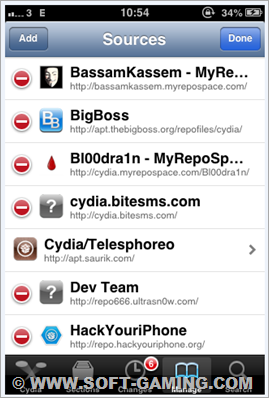
di dalam cydia, dikenal yang namanya repo. repo atau repository adalah suatu situs yang menyediakan beribu-ribu aplikasi cydia baik itu tweaks, theme, ataupun aplikasi lain. untuk menginstal aplikasi di cydia, kita harus tahu repo dari aplikasi tersebut. disini saya akan contohkan cara menginstal tweak bernama “delete mail” yang dikketahui berasal dari repo http://cydia.xsellize.com/
  1. buka cydia, masuk ke manage > edit > addimage

perbedaan aplikasi cydia dan appstore

image   untuk anda yang baru masuk di dunia jailbreak, anda mungkkin akan sedikkit bingung, tentang apa bedanya aplikasi yang ada di appstore dan aplikasi yanng ada di cydia, apa itu tweak dan bagaimana cara instalnya, dan lain lain. baiklah, untuk kali ini saya akann mencoba jelaskan satu persatu

1. Apa sih beda aplikasi yang di appstore dan yang di cydia itu?
    jika anda pernah beranggapan bahwa aplikasi yang di cydia adalah semua aplikasi di appstore tapi yang gratis, maka anda salah besar.  cydia sangat berbeda dengan appstore. appstore menyediakan aplikkasi yang langsung bisa digunakan, sedangkan cydia hanya menyediakan tweak untuk merubah system iphone dan menunjang performa iphone kita ataupun aplikasi yang disediakan di appstore.
    2.  bagaimana cydia bisa menyediakan aplikasi appstore secara gratis?
    Cydia TIDAK PERNAH menyediakan aplikasi appstore gratisan / bajakan. yang bisa dilakukan cydia adalah menginstal tweak bernama “appsync” ke dalam iphone kita sehingga iphone kita bisa di instal aplikasi bajakan dengan cara mencari file .ipa-nya di internet kemudian menginstalnya ke iphone menggunakan itunes.  jadi misal kita ingin menginstal whatsapp, kita tinggal cari di gugel dengan kata kunci whatsapp.ipa. setelah ketemu, kita instal whatsapp.ipa tadi menggunakan ifunbox.